
What Is a ClickFix Attack? The Dangerous Fake CAPTCHA Scam Explained
ClickFix Attack are a rapidly growing cyber threat that uses fake CAPTCHA verification pages and social engineering tricks to manipulate users into running malware on their own devices. Learn how these scams work, the warning signs to watch for, and the practical steps you can take to stay protecte
ETHICAL HACKING
By Muhammad Ibraheem • Founder of Hackers Legacy • Cybersecurity Researcher & Privacy Analyst
6/20/20268 min read
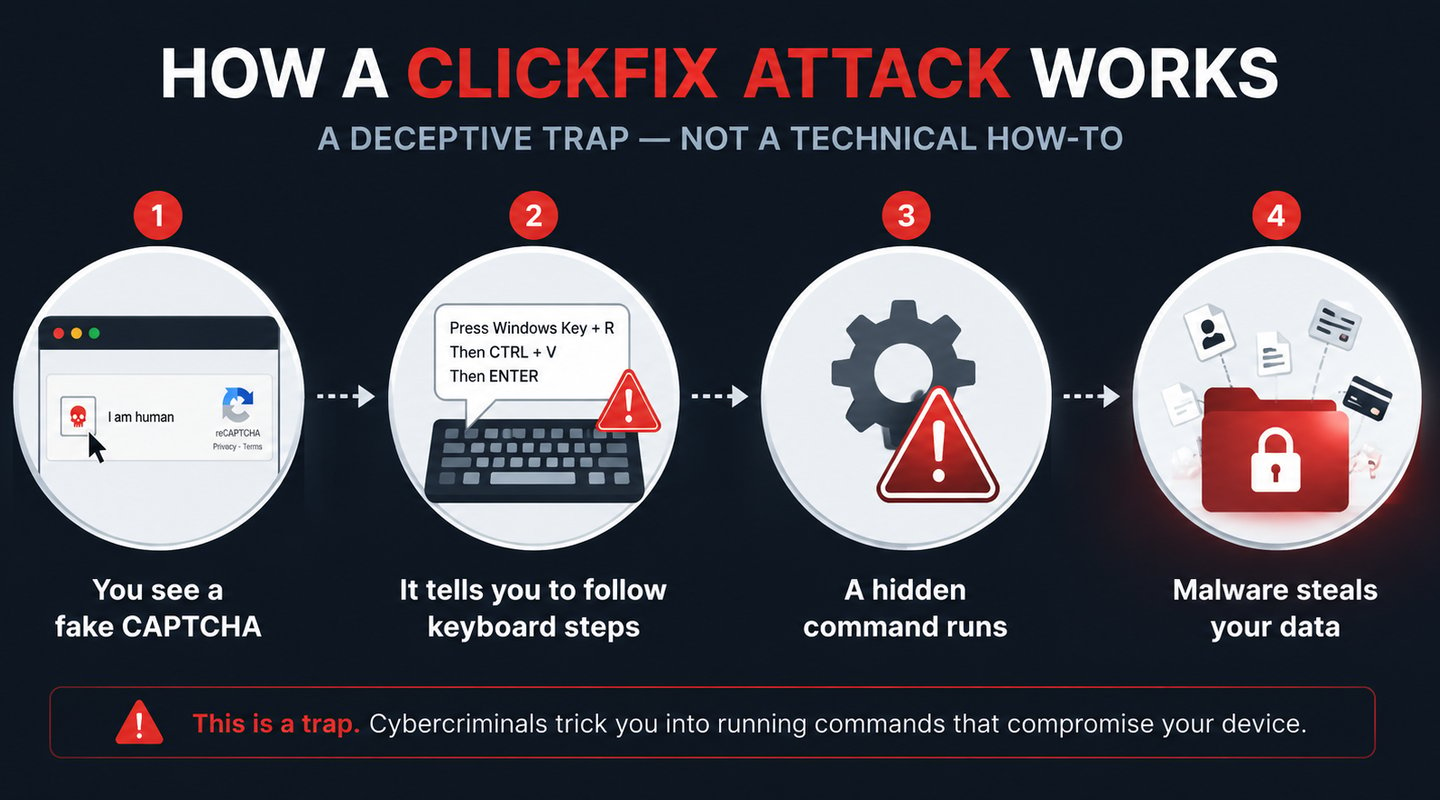
You know the drill by now. You land on a website, and a little box pops up: "Verify you are human." You click a checkbox, maybe identify a few traffic lights, and you're through. You've done it a thousand times without thinking.
That reflex — that automatic, barely-conscious habit — is exactly what a new generation of scammers is weaponizing against you.
It's called ClickFix, and it has quietly become one of the most successful cyberattacks on the internet. It doesn't break into your computer. It doesn't exploit some obscure software bug. Instead, it does something far more clever and far more unsettling: it tricks you into compromising your own device, with your own hands, believing the entire time that you're just passing a routine security check.
And it works alarmingly well. Let me show you exactly how to recognize it, why your antivirus probably won't save you, and what to do if you've already fallen for it.
What Is a ClickFix Attack?
ClickFix is a social engineering technique — meaning it hacks the human, not the machine.
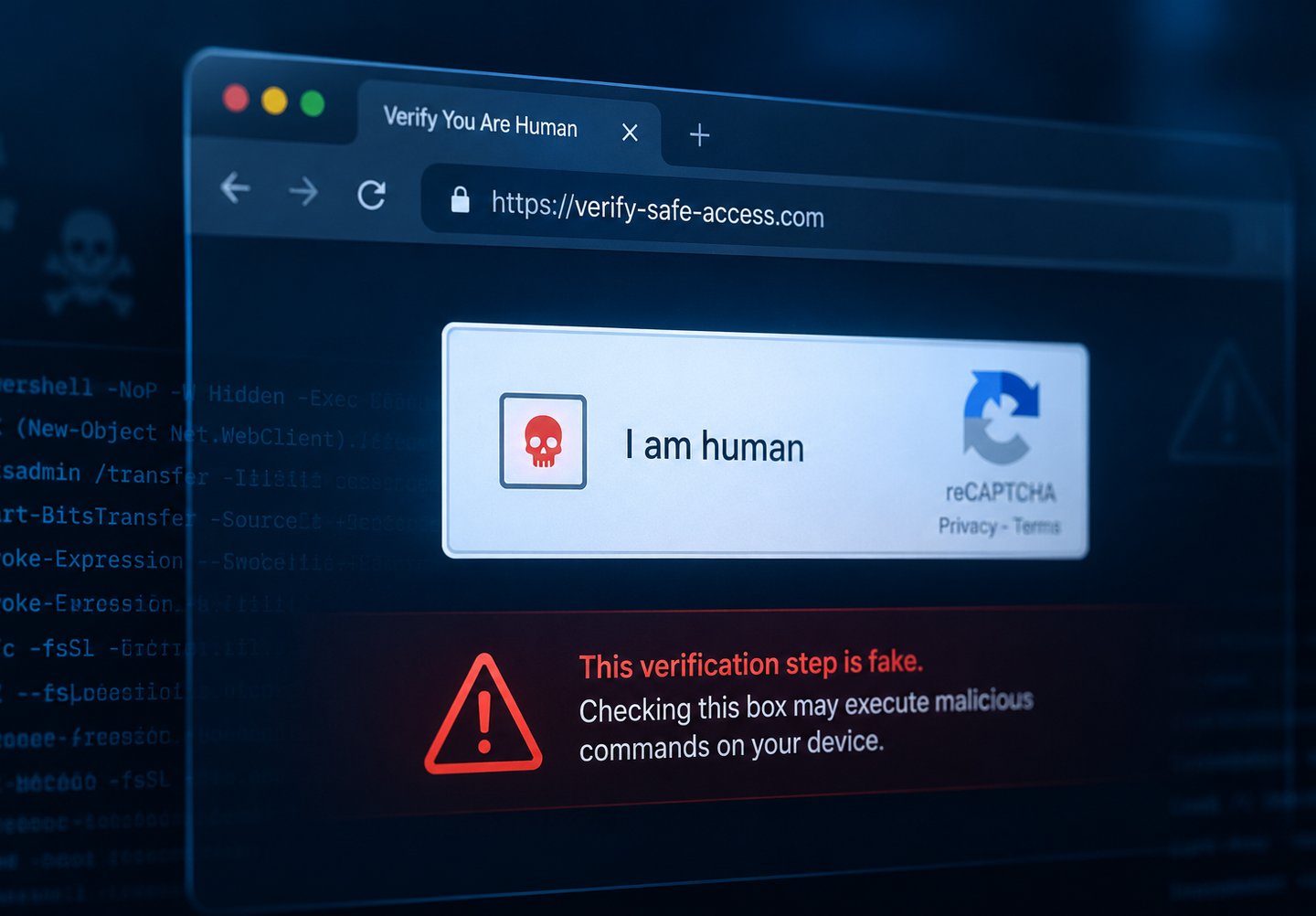
The scam disguises itself as a familiar, trustworthy moment: a CAPTCHA challenge, a browser error message, or a "verification" step. You've seen legitimate versions countless times — Google's reCAPTCHA, Cloudflare's "I am human" checkbox. The fake version copies that exact look and feel, right down to the logos and colors.
But instead of a normal challenge, the fake page gives you a short set of keyboard "steps" to follow to complete the verification. Those steps instruct you to open a built-in system tool on your computer and complete an action that the page presents as routine.
What's actually happening behind the scenes is the dangerous part — and I'll keep this deliberately high-level, because the point here is recognition, not instruction. When you follow those steps, you unknowingly trigger a command that the malicious page already placed onto your clipboard. That command quietly downloads and installs malware — typically an infostealer designed to grab your saved passwords, browser cookies, and financial details, or a remote access trojan that hands a stranger control of your machine.
The genius and the horror of it are the same thing: you did it yourself. No security warning fired, because from your computer's perspective, the user simply ran a command. You were the one holding the keyboard.
Why This Attack Is Exploding
ClickFix isn't a niche threat anymore. The numbers are staggering.
According to security researchers, ClickFix activity surged roughly 517% in the first half of 2025, and a separate analysis found a 400% year-over-year increase. By 2026, it accounts for a remarkable 47% of the initial-access attacks tracked by Microsoft — meaning nearly half of the ways attackers first get into systems now start with this single technique. The U.S. Federal Trade Commission issued a fresh public warning about it in June 2026, and the Department of Health and Human Services put out a sector alert for healthcare earlier in the year.
So why is it everywhere? A few reasons make it devastatingly effective:
It weaponizes muscle memory. You've been trained by years of legitimate CAPTCHAs to follow verification prompts without scrutiny. The attack exploits that exact conditioning.
It bypasses your antivirus. This is the scary part. Traditional security tools scan for malicious files being downloaded. But in the first stage of a ClickFix attack, nothing is downloaded — the malicious instruction is just a piece of text sitting on your clipboard. There's no file to scan until it's too late. Security researchers note that legacy antivirus rarely catches these "paste-based" attacks because no file touches the disk until the final stage.
It sidesteps email filters. Many attacks arrive not through email, but through compromised advertisements, hacked websites, and poisoned search results — channels your email security never sees.
Where You'll Encounter It
ClickFix lures show up in more places than you'd expect. Knowing the common delivery routes helps you stay alert:
Compromised legitimate websites. Attackers inject code into real sites they've breached. Attackers often combine this with publicly available information about you — the same data OSINT tools can surface in seconds. including ordinary blogs you might visit for recipes, news, or how-to guides. Suddenly a site you've used before shows a full-page "security check" it never displayed previously.
Malicious ads on streaming and pirate sites. Free movie streaming pages and pirated content sites have funneled hundreds of thousands of users per day toward these traps. Microsoft documented campaigns delivering infostealer malware this exact way.
Fake verification for "perks." One widespread 2026 campaign targeted social media creators with promises of free verified badges, walking them through fake steps to "verify" — while actually stealing their account access.
SEO-poisoned search results. Sometimes the malicious page ranks in search results for common queries, so you land on it by simply clicking what looks like a normal result.
The One Rule That Stops 99% of These Attacks
Here's the single most important thing to take away from this entire article. Security researchers who track ClickFix daily say one rule catches nearly every version of this scam:
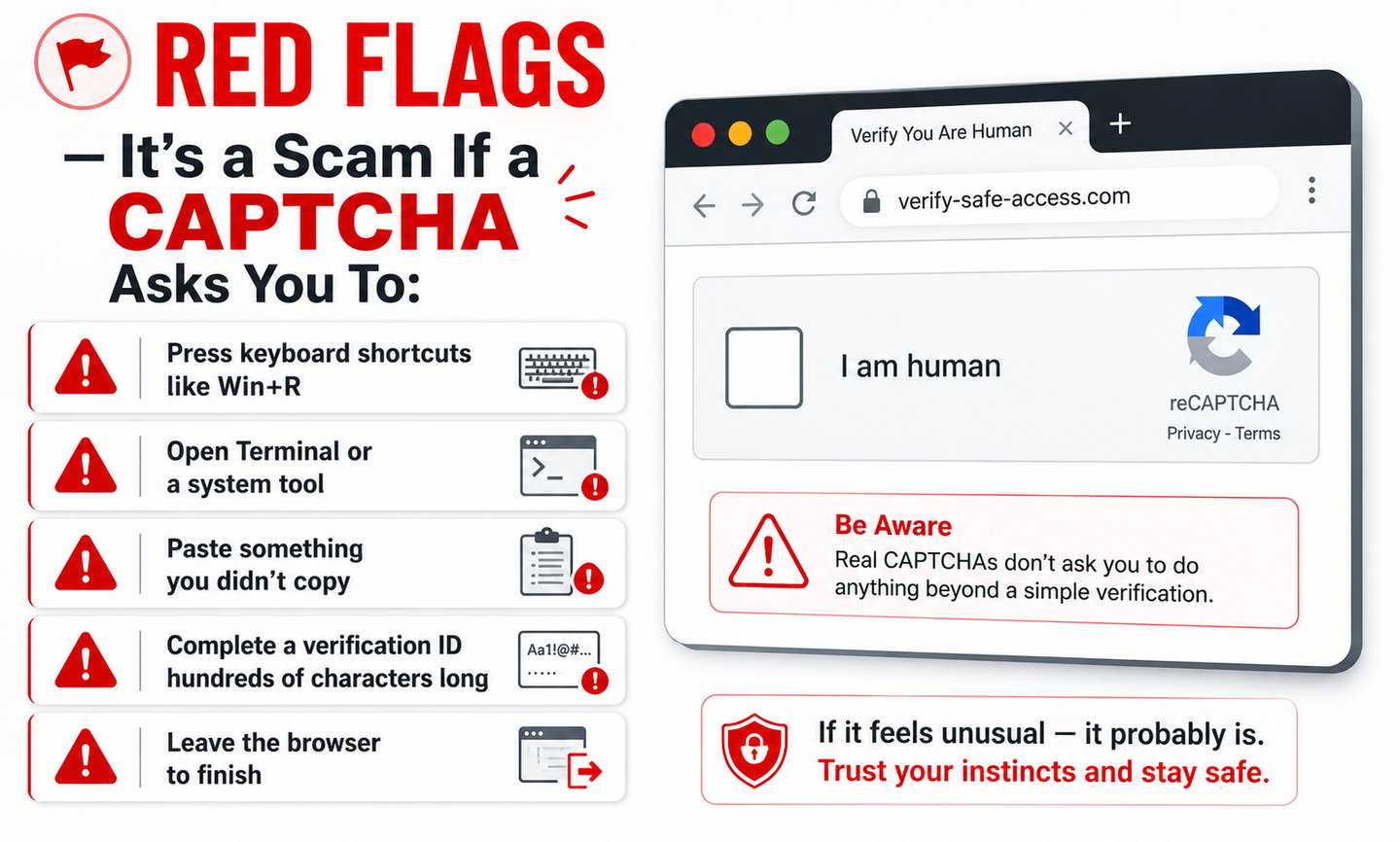
A real CAPTCHA happens entirely inside your browser tab. It never asks you to leave the page or run anything on your device.
That's it. A legitimate verification asks you to type distorted letters or click images with traffic lights — all within the webpage. The moment a "verification" step tells you to press keyboard shortcuts, open a system tool, or paste something, it has stopped being a CAPTCHA and started being an attack.
If that happens: close the tab immediately. Don't follow the steps. Don't finish "just to see."
Specific Red Flags to Watch For
Beyond the golden rule, here are the warning signs that should make you close the tab instantly:
A page instructing you to press keyboard combinations or open any system tool. No legitimate site — not Microsoft, not Adobe, not your bank, not a "codec update" page — needs you to do this. Ever.
A "verification ID" or code that's suspiciously long, stretching to hundreds of characters. Real verification tokens are short. A giant string of random characters is the hidden malicious command in disguise.
A full-page "security check" suddenly appearing on a site you've visited before that never showed one. This is a strong sign the site has been compromised.
The address bar changing or redirecting through unfamiliar domains during the "verification." Normal verification doesn't bounce you across multiple websites.
What to Do If You've Already Followed the Steps
If you're reading this with a sinking feeling because you recognize what happened to you — don't panic, but act quickly. Time matters here.
Disconnect from the internet right away. Turn off Wi-Fi or unplug your ethernet cable. This can interrupt malware that's trying to communicate with the attacker or download additional components.
Change your critical passwords from a different device. Use your phone or another clean computer to change passwords for your email, banking, and important accounts. Don't use the potentially infected machine. Start with your email, since it's the key to resetting everything else.
Run a full malware scan with a reputable tool. Use a trusted security product like Malwarebytes to scan the affected device thoroughly. Consider running a scan with a second tool as well, since these threats are designed to evade detection.
Enable two-factor authentication everywhere. If an infostealer grabbed your saved passwords, 2FA may be the only thing standing between an attacker and your accounts. Set it up using an app like Authy on your clean device.
Watch for fraud. Monitor your bank and credit card statements closely, and consider checking your exposure with HaveIBeenPwned over the following weeks.If you discover your data has leaked, here's a full step-by-step recovery guide.
When in doubt, get professional help or reset. Because these infections can be stubborn, the safest option for a seriously compromised machine is often a professional cleanup or a full operating system reinstall after backing up your important files.
Report it. In the US, report to the FTC and the FBI's IC3. Reporting helps authorities track these campaigns.
How to Protect Yourself Going Forward
A few habits dramatically reduce your risk of ever falling for ClickFix:
The most powerful defense is simply the awareness you now have — internalize the golden rule and you're ahead of most people. Beyond that, keep your browser updated, since modern browsers are adding protections against malicious clipboard manipulation. Some users add a browser extension switching to a more privacy- and security-focused browser adds another layer of protection specifically designed to block these clipboard-based attacks. Be especially cautious on pirated content and free streaming sites, which are hotbeds for these lures. And if you manage a household or small business, talk to family members and employees about this — awareness is genuinely the strongest layer of defense, because this attack targets human behavior, not software.
The Bigger Picture: Attacks That Make You the Weak Link
ClickFix is part of a broader, unsettling shift in how cybercrime works in 2026. Increasingly, attackers aren't bothering to "break in" through technical exploits. They're simply convincing you to open the door yourself. This is the same pattern behind the viral OnlyFans 'hack' — where recycled data was repackaged to manipulate people, not breach a server because it's cheaper, easier, and slips right past the expensive security tools companies and individuals rely on.
This is what makes modern social engineering so dangerous. The technology designed to protect you can't help much when you're the one being manipulated into running the harmful action. Your awareness becomes the firewall.
The good news? Awareness is something you fully control. You can't patch human nature, but you can educate it. Now that you know how ClickFix works, you're far less likely to be its next victim — and you can protect the people around you who haven't heard of it yet.
The next time a verification box asks you to do something outside your browser, you'll know exactly what it really is. And you'll close the tab.
Frequently Asked Questions
What is a ClickFix attack in simple terms? ClickFix is a scam that disguises itself as a fake CAPTCHA or browser error message and tricks you into running a command on your own computer that secretly installs malware. It's effective because it abuses the habit of completing verification prompts without thinking, and because no malicious file is downloaded in the first stage, so antivirus often misses it.
How can I tell a fake CAPTCHA from a real one? A real CAPTCHA is completed entirely inside your browser — typing letters or clicking images. A fake one asks you to leave the browser, press keyboard shortcuts, open a system tool, or paste something. If a "verification" asks you to do anything on your device outside the webpage, it's a scam. Close the tab.
Will my antivirus protect me from ClickFix? Often not in the early stages. Because the initial malicious instruction is just text on your clipboard rather than a downloaded file, traditional antivirus frequently fails to catch it until malware is already installing. This is exactly why user awareness is the most important defense.
What should I do if I already followed a fake CAPTCHA's steps? Disconnect from the internet immediately, change your important passwords from a separate clean device, run a full scan with a reputable malware tool, enable two-factor authentication, monitor your financial accounts, and report it to the FTC and FBI. For serious infections, professional cleanup or an OS reinstall is the safest route.
Why is ClickFix becoming so common? It's cheap, scalable, and highly effective. It bypasses email filters (since it often spreads through ads and compromised sites), sidesteps antivirus (since nothing is downloaded initially), and exploits the muscle memory people have built from years of passing legitimate CAPTCHAs. Reports show increases of 400–517% in recent measurement periods.
About the Author
Muhammad Ibraheem
Founder of Hackers Legacy | Cybersecurity Researcher & Privacy Analyst
Muhammad Ibraheem is a cybersecurity content creator with more than three years of experience producing educational content on ethical hacking, OSINT, privacy, and digital security. Through Hackers Legacy, he helps readers separate real cybersecurity threats from viral hype through research-driven analysis and educational content.
References & Further Reading
The Hacker News — ClickFix Attacks Expand Using Fake CAPTCHAs
FTC — Consumer Alerts on Online Scams
Microsoft Security — Threat Intelligence Blog
Proofpoint — ClickFix Social Engineering Research
Eye Security — ClickFix Block & Fake CAPTCHA Defense
Malwarebytes — Free Malware Scanner
Have I Been Pwned — Check Your Email for Breaches
Authy — Two-Factor Authentication App
FBI Internet Crime Complaint Center (IC3)

HACKERS LEGACY

Your ultimate knowledge for Ethical Hacking, Cybersecurity insights, digital products and a global community of curious minds.
LEARN . HACK . LEAD
Quick Links
Resources
Contact Us
> Email Us
> Response Time
Within 24 Hours
> World Wide Access
We are available globally.
©2026 Hackers Legacy
All righs reserved.
Built for learners
Secured for the future.