
10 Free OSINT Tools That Feel Illegal in 2026
Discover 10 free OSINT tools investigators and journalists actually use — and learn how to protect your own digital footprint from each one.
OSINTTOOLS
6/15/20268 min read


You don't need to download anything for the most powerful OSINT tool on earth. You already use it daily.
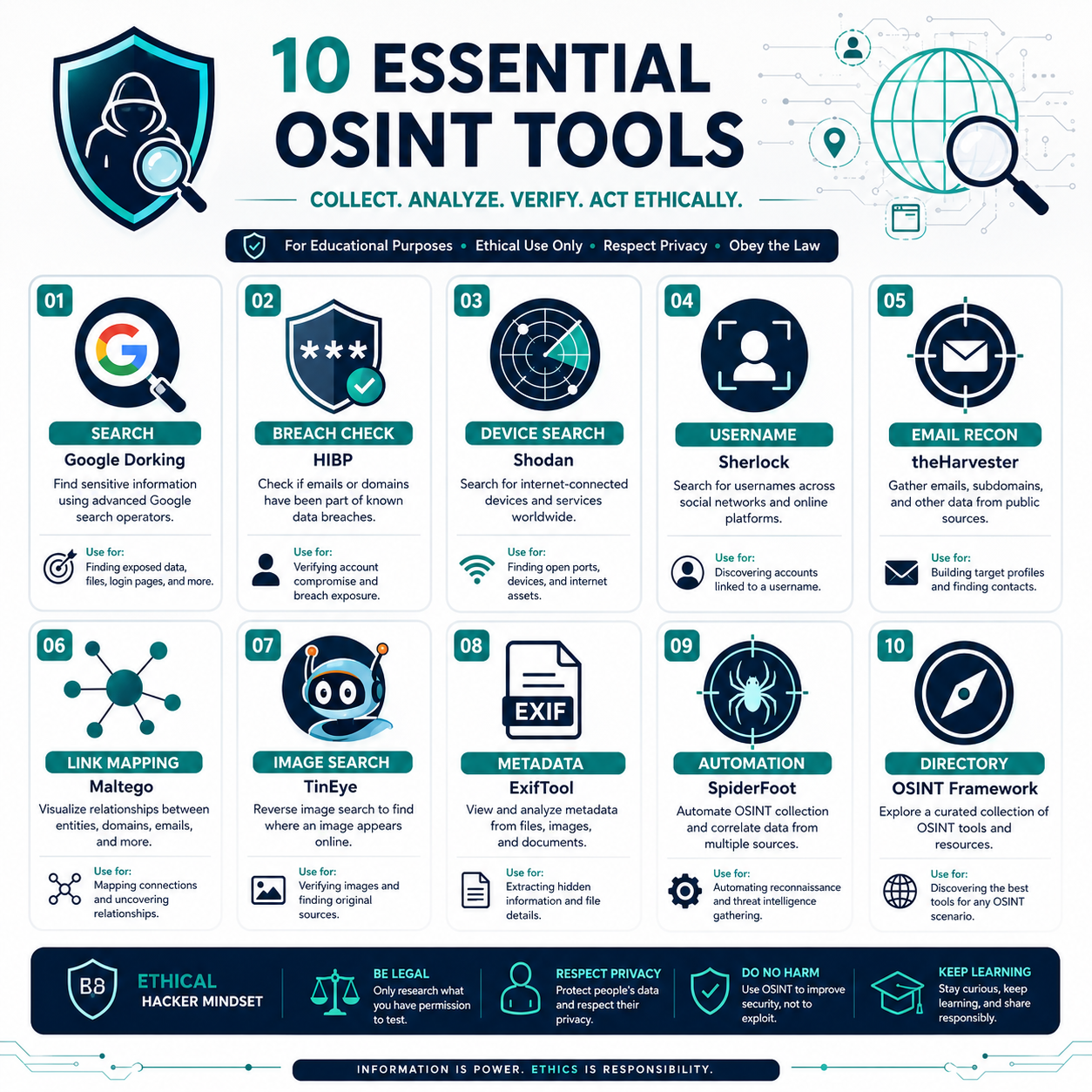
Google Dorking (or "Google hacking") is the practice of using advanced search operators to find things regular searches miss. Operators like site:, filetype:, intitle:, and inurl: let you surgically search for exposed documents, specific file types, and pages that were never meant to be easily found — all through Google's normal, public index.
Security professionals use it to find accidentally exposed company files. Journalists use it to surface public records. It's the foundation of nearly every OSINT investigation.
Protect yourself: Search site:yourname.com and your own name in quotes to see what's publicly indexed about you. If sensitive documents show up, contact the hosting site to remove them and request removal from Google's cache.
First — Why This Is All Completely Legal
The first time I ran my own name through an OSINT tool, I genuinely felt a little sick.
Not because anything illegal happened — every single thing it found was already public, sitting in the open, available to anyone who knew where to look. That was exactly the problem. An old forum account from 2014. A photo with location metadata still embedded. An email address connected to six different breaches. A home address from a property record. All of it stitched together in about ninety seconds by a free tool that anyone can download.
This is the strange, unsettling world of OSINT — Open Source Intelligence. And once you understand it, you can never quite look at your own online presence the same way again.
Here's the thing nobody tells you: OSINT isn't hacking. Hacking breaks into systems. OSINT just collects what's already public and connects the dots faster than any human could. In 2026, OSINT has evolved from a niche skill into a foundational discipline across cybersecurity, journalism, corporate intelligence, and digital investigations — and the most powerful tools remain completely free, legal, and accessible to anyone willing to learn.
Journalists use these tools to verify war footage. Recruiters use them to vet candidates. Fraud investigators use them to catch scammers. And yes — the same tools that protect you can expose you, which is exactly why you should understand them.
Let me show you ten of them. And more importantly, let me show you how to defend against each one.
1. Google Dorking: The Search Engine You Already Have
Before we dive in, let's kill the anxiety the title gave you.
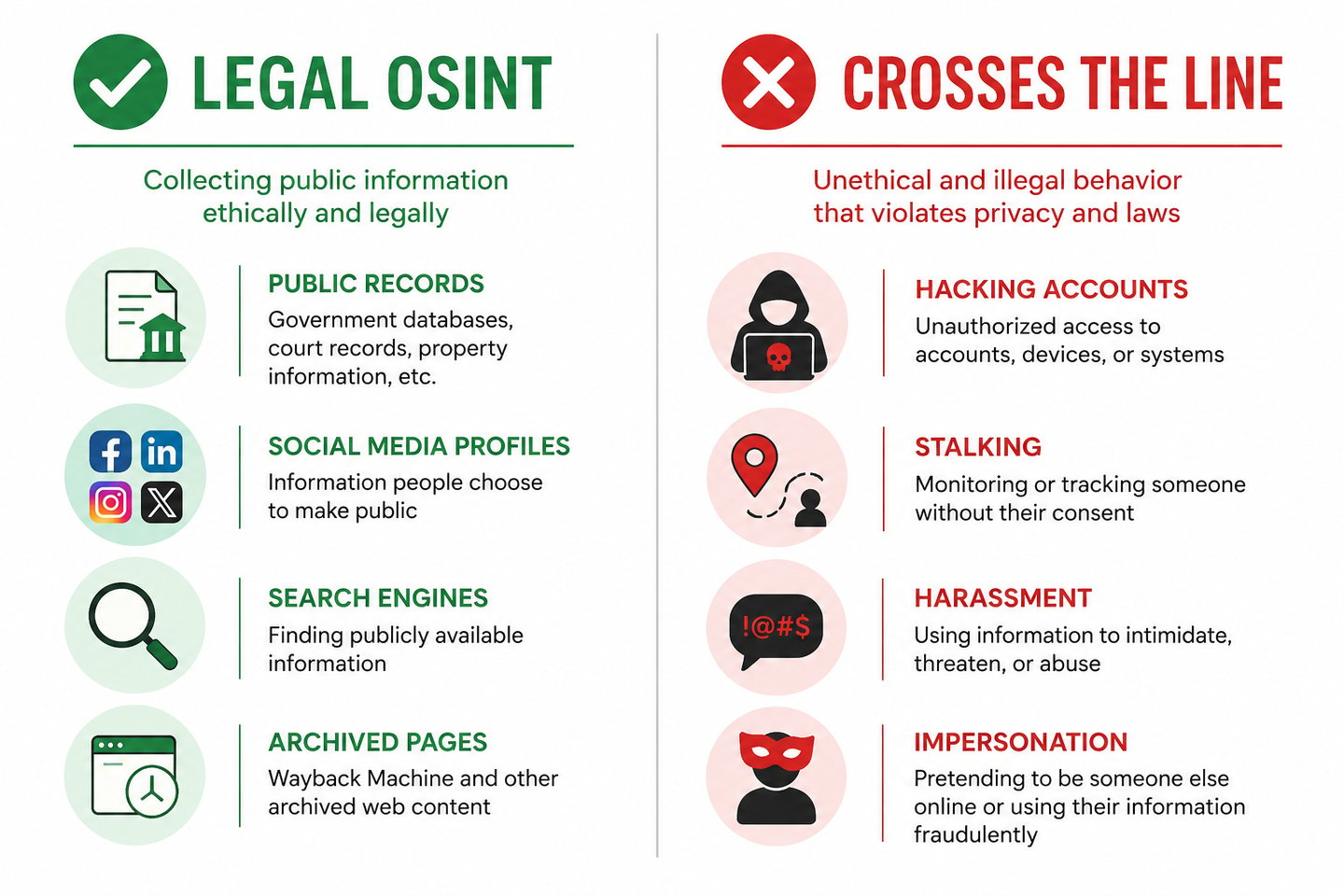
These tools feel illegal because they're powerful. But every one of them operates on a simple principle: they only access publicly available information. No breaking into accounts. No bypassing passwords. No unauthorized access. They're just search engines and data aggregators pointed at information you — or companies holding your data — already made public.
Ethical OSINT focuses on analysis and validation, not exploitation. The legal line is bright and clear: collecting public data is legal. Using it to harass, stalk, impersonate, or defraud someone is very much not. The tool is neutral. The intent is everything.
With that established — here's the toolkit.
2. Have I Been Pwned: The Breach Checker Everyone Should Use
HaveIBeenPwned is the simplest tool here and arguably the most important. Run by respected security researcher Troy Hunt, it tells you instantly whether your email address has appeared in any known data breach.
The reason it feels unsettling is the sheer scale of what it reveals. Most people enter their email expecting nothing and discover they're in five, ten, or fifteen breaches going back a decade.
Protect yourself: This one IS the protection. Check every email you use, change passwords for any breached accounts, and enable two-factor authentication everywhere. Set up the free alerts so you're notified of future breaches automatically.
3. Shodan: The Search Engine for Everything Connected
If Google indexes websites, Shodan indexes devices. Webcams, routers, servers, smart home gadgets, industrial control systems — anything connected to the internet with an exposed interface.
This is the one that genuinely alarms people. Security researchers use Shodan to find vulnerable devices before criminals do, and to help organizations discover exposed assets they forgot existed. It's an essential defensive tool — but it reveals just how much hardware is sitting online unprotected.
Protect yourself: Make sure your home router, security cameras, and smart devices aren't using default passwords and aren't unnecessarily exposed to the internet. Change default credentials immediately on any new device, and disable remote access features you don't use.
4. Sherlock: Find a Username Everywhere at Once
Sherlock is a free, open-source tool that takes a single username and checks for it across hundreds of social platforms simultaneously. Within seconds, it returns every site where that username exists.
Investigators and journalists use it to map someone's public online presence. It feels invasive because of how comprehensive it is — but it only finds public profiles that anyone could find manually, just much faster.
Protect yourself: Use different usernames across different platforms, especially separating your professional identity from personal accounts. Reusing one memorable handle everywhere makes your entire digital footprint trivially easy to map.
5. TheHarvester: The Reconnaissance Classic
theHarvester gathers email addresses, subdomains, hostnames, and employee names associated with a domain — all from public sources like search engines and public databases.
It's a staple of authorized penetration testing, where security teams use it to understand an organization's public attack surface before testing its defenses. The unsettling part is seeing how much organizational structure can be reconstructed from purely public fragments.
Protect yourself (for businesses): Limit how much employee information is publicly exposed, be cautious with email naming conventions, and conduct your own reconnaissance regularly to understand what's visible about your organization.
6. Maltego: The Relationship Mapper
Maltego is where OSINT starts to look like the conspiracy wall from a detective show — except automated. It aggregates data from multiple sources to visualize relationships between entities like individuals, domains, and IP addresses, providing threat context and attack surface mapping.
Its free Community Edition is widely used by security teams and investigators to uncover hidden connections — how a domain links to an email, which links to a social profile, which links to another person. The visual web it builds is genuinely striking.
Protect yourself: Be mindful of how your different online identities connect. The more you link accounts, reuse contact details, and cross-reference yourself publicly, the richer this map becomes for anyone looking.
7. TinEye & Reverse Image Search: Catch the Catfish
TinEye and reverse image search tools let you upload any photo and find everywhere it appears online. Originally built for photographers tracking image theft, they've become essential for verifying authenticity.
This is the tool that exposes catfishing, fake dating profiles, and stolen photos. It feels like magic the first time you trace a "stranger's" profile picture back to a stock photo site or someone else's Instagram.
Protect yourself: Reverse-search your own profile photos to see where they appear. If someone is using your images without permission, you'll find out — and you can take action.
8. ExifTool: The Hidden Data in Your Photos
Every photo your phone takes can carry hidden metadata: the camera model, the exact date and time, and often the precise GPS coordinates where it was shot. ExifTool reads all of it instantly.
This is the one that makes people gasp. That casual photo you posted from home? It might contain the exact latitude and longitude of where you stood. Investigators use this to verify when and where images were taken; the privacy risk is obvious.
Protect yourself: Most social platforms strip metadata automatically, but not all do, and not for direct file shares. Turn off location tagging in your phone's camera settings, and strip metadata from images before sharing them directly. On iPhone, you can remove location data when sharing; on Android, similar options exist in your gallery app.
9. SpiderFoot: The Automation Engine
SpiderFoot ties much of the above together. It's an open-source automation tool that runs hundreds of OSINT queries against a target — an email, name, domain, or IP — and compiles the results into a single report, pulling from over 200 data sources.
Security teams use it to automate the tedious parts of footprint analysis. Seeing a complete automated report on yourself is the moment most people decide to take their privacy seriously.
Protect yourself: Run it on your own email and domain (only your own) to see your complete public footprint in one place. It's the fastest way to understand exactly what's exposed — so you can start cleaning it up.
10. OSINT Framework: The Map to Everything Else
OSINT Framework isn't a single tool — it's a constantly updated, categorized directory of hundreds of OSINT resources, organized by what you're trying to investigate. Email addresses, usernames, phone numbers, public records, and more.
It's the starting point professionals use to find the right tool for a specific task. Browsing it is the fastest way to grasp just how vast the public-data landscape really is.
Protect yourself: Use it as a checklist. Each category represents a type of information that might be exposed about you. Work through the ones that matter and audit your own exposure systematically.
The Real Lesson: Turn the Tools on Yourself
Here's what changed for me after that first unsettling search.
I stopped thinking of OSINT as something scary that other people could do to me, and started using it as a mirror. Every one of these tools can be pointed at yourself — and doing so is the single most effective privacy audit you can perform. You can't fix exposure you don't know about.
So I spent one weekend running myself through the legitimate ones: checked my emails on Have I Been Pwned, reverse-searched my profile photos, audited what Google had indexed, stripped metadata from my photo library, and locked down the old accounts I'd forgotten existed.
The discomfort of seeing your exposed footprint is exactly what motivates you to shrink it. That's the gift hidden inside the unease.
These tools aren't illegal, and they aren't going away. The people who understand them — and use them responsibly — are simply harder to surprise, harder to scam, and harder to expose. In 2026, that's not paranoia. That's basic digital literacy.
The internet already knows a lot about you. The only real question is whether you know it too
Frequently Asked Questions
Is using OSINT tools legal? Yes — using OSINT tools to gather publicly available information is legal in most countries. What matters is intent and use. Collecting public data for research, journalism, security, or self-protection is legal. Using it to stalk, harass, impersonate, or defraud someone is illegal regardless of the tool.
Can I use OSINT to look up other people? The tools allow it, but ethics and law set firm boundaries. Using OSINT to investigate yourself, verify a business, or check a suspicious profile is reasonable. Using it to surveil, track, or harass an individual crosses serious legal and ethical lines and can constitute stalking or harassment.
What's the difference between OSINT and hacking? Hacking involves unauthorized access to systems, accounts, or data — which is illegal. OSINT only collects information that is already publicly available, requiring no unauthorized access. OSINT is fundamentally passive observation of public data; hacking is active intrusion.
Do I need technical skills to use these tools? Some, like Have I Been Pwned and TinEye, require zero technical skill — just a web browser. Others, like theHarvester, Sherlock, and SpiderFoot, are command-line tools that require basic comfort with a terminal. Maltego offers a visual interface that's beginner-friendly.
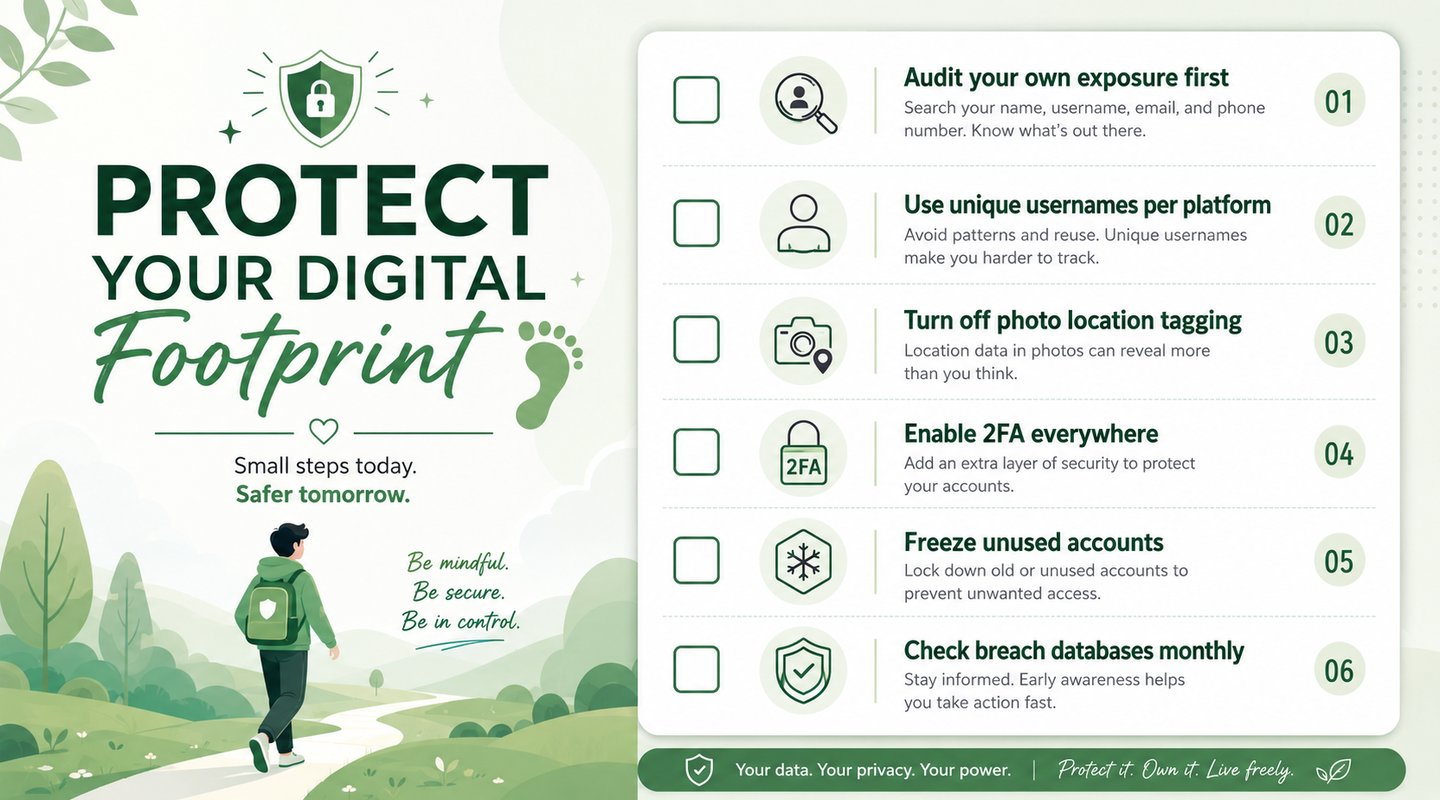
How do I protect myself from OSINT exposure? Start by auditing your own footprint with these tools. Then use unique usernames per platform, enable two-factor authentication, turn off photo geotagging, strip metadata before sharing files, delete unused accounts, opt out of data broker sites, and check breach databases regularly.
Privacy in 2026 isn't about disappearing — that's impossible. It's about understanding your own exposure and making deliberate choices about it. These tools, used on yourself, hand you that understanding.
Found this useful? Share it with someone who's never thought about their digital footprint. They'll thank you later.
References & Further Reading

HACKERS LEGACY

Your ultimate knowledge for Ethical Hacking, Cybersecurity insights, digital products and a global community of curious minds.
LEARN . HACK . LEAD
Quick Links
Resources
Contact Us
> Email Us
> Response Time
Within 24 Hours
> World Wide Access
We are available globally.
©2026 Hackers Legacy
All righs reserved.
Built for learners
Secured for the future.